


The Reflexis App Key remains an essential component for employees using the Reflexis One platform in 2026. As more companies adopt Reflexis for workforce management, scheduling, task execution, and real‑time communication, the App Key ensures secure authentication and smooth onboarding. This updated guide explains how the Reflexis App Key works today, how to generate it, how to log in across devices, and how to troubleshoot common issues based on the latest Reflexis (Zebra Technologies) updates.
What Is the Reflexis App Key?
The Reflexis App Key is a unique, company‑specific code that allows employees to securely connect their mobile device to their organization’s Reflexis environment. It acts as a gateway between the Reflexis One app and the employer’s internal system, ensuring that only authorized users can access schedules, timecards, tasks, and communication tools.
In 2026, Reflexis App Keys are still widely used across retail, hospitality, logistics, and healthcare organizations, especially those using Reflexis Workforce Scheduler (RWS), MyWork, and ESS (Employee Self‑Service).
How the Reflexis App Key Works in 2026
Reflexis has improved its authentication process, but the App Key remains the first step for new users. The App Key:
- Identifies your company’s Reflexis environment
- Connects your device to the correct server
- Enables secure login using your employee credentials
- Ensures compliance with updated Zebra security standards
Most companies provide the App Key during onboarding or through internal HR portals.
How to Find Your Reflexis App Key
Employees typically receive the App Key from:
- HR or store management
- Company onboarding documents
- Internal employee portals
- IT support teams
Some organizations now use QR codes instead of manually typing the App Key, but the traditional alphanumeric key is still widely used.
How to Log In Using the Reflexis App Key
- Download Reflexis One from the App Store or Google Play.
- Open the app and select Enter App Key.
- Type the company‑provided App Key exactly as given.
- The app will redirect you to your organization’s login page.
- Enter your employee ID and password.
- Complete any two‑factor authentication if required.
Once logged in, the App Key is saved and does not need to be re‑entered unless you reinstall the app or switch devices.
Updated Features in Reflexis (2026)
Reflexis has rolled out several improvements:
- Faster syncing of schedules and shift swaps
- Enhanced biometric login support
- Better offline mode for field teams
- Updated task dashboards for managers
- Improved ESS interface for employees
These updates make the App Key process smoother and reduce login errors.
001‑qk7yulqsx9esa1il5mxjkg‑3342555957 (What It Means)
The string 001‑qk7yulqsx9esa1il5mxjkg‑3342555957 resembles the format of internal Reflexis environment identifiers used by some companies. While not a universal App Key, this type of code is often used to:
- Identify a specific Reflexis server instance
- Connect employees to a regional or store‑level environment
- Authenticate devices during initial setup
Companies sometimes use long alphanumeric keys like this to enhance security and prevent unauthorized access. If your organization provided this exact code, it should be entered into the App Key field exactly as written.
001 qk7yulqsx9esa1il5mxjkg 3342555957 Manual (Understanding the Format)
When employees search for a “001 qk7yulqsx9esa1il5mxjkg 3342555957 manual”, they are typically looking for instructions on how to use or enter a Reflexis App Key. While Reflexis does not publish manuals for individual App Keys, the general process is:
- Enter the full alphanumeric key without altering spacing
- Ensure capitalization matches the provided format
- Confirm the key corresponds to your company’s environment
- Contact IT if the key fails, as it may be time‑limited or environment‑specific
This type of code is not a universal Reflexis key but a company‑assigned identifier.
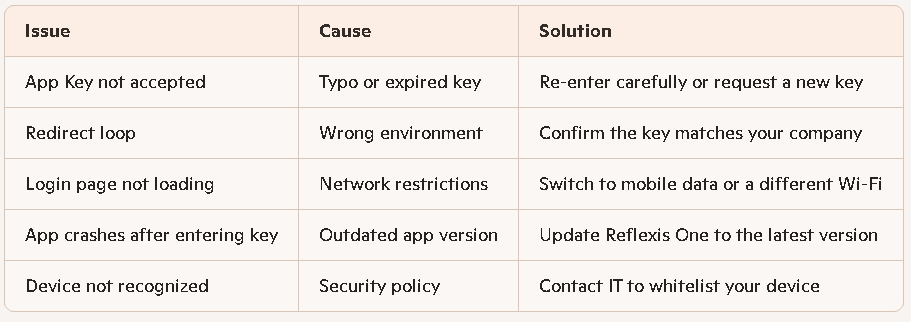
Common Reflexis App Key Issues & Fixes (2026)
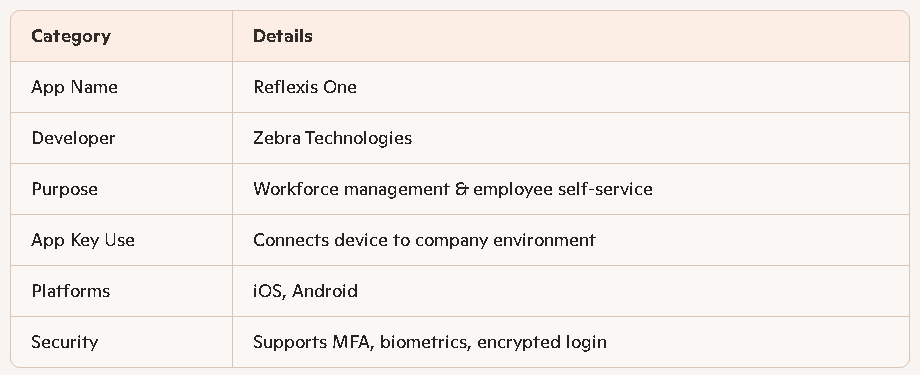
Reflexis App Key Quick Facts (2026)
Final Thoughts
The Reflexis App Key remains a crucial part of the login process for employees using Reflexis One in 2026. With improved security, faster authentication, and better mobile performance, the App Key ensures that each user connects to the correct company environment. Whether you’re entering a standard App Key or a long identifier like 001‑qk7yulqsx9esa1il5mxjkg‑3342555957, the process is straightforward once you understand how Reflexis structures its environment codes.
If your organization uses Reflexis, keeping your App Key accessible and accurate ensures smooth access to schedules, tasks, and communication tools every day.